Per home stager, agenti e venditori
Arredamento con IA per stanze vuote o arredate a metà.
Carica una foto della stanza. SofaBrain la arreda nello stile che scegli, dallo stesso punto di vista, oppure aggiunge pezzi attorno ai mobili già presenti. Confrontala con l'originale e tieni ciò che funziona.
- 3 crediti gratuiti per i nuovi account
- 1 credito per stanza arredata
- Studio: $59 al mese per 100 crediti
Un risultato reale: il dopo è ciò che home staging virtuale ha creato dal prima. Trascina per confrontare.

Come funziona
Entra una stanza vuota.Ne esce una arredata.
Parti da una stanza vuota, arredata a metà o disordinata da svuotare prima. Pareti, pavimenti e finestre restano.
- 1
Carica la stanza
Vuota, arredata a metà o disordinata. Svuotala prima, se serve.
- 2
Scegli la stanza e uno stile
5 stili nello strumento di staging, 27 nello studio di design. L'arredamento mantiene i pezzi già presenti.
- 3
Confronta e tieni
Trascina tra l'originale e la stanza arredata, poi scarica. Segnala le foto con staging ovunque le pubblichi.
Gli strumenti
Arredala, completalao dalle una nuova funzione.
Usa lo strumento di staging per le stanze vuote e l'arredamento dello studio di design quando alcuni pezzi devono restare.
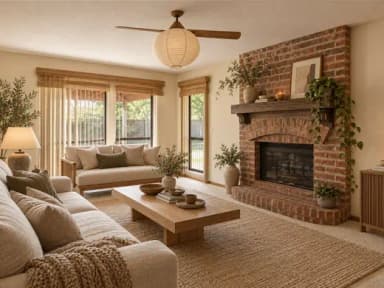 Japandi
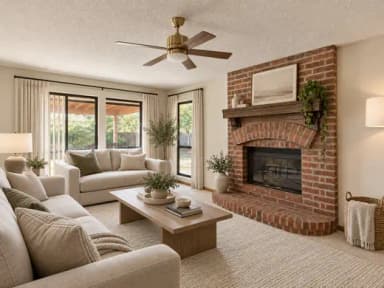 Moderno
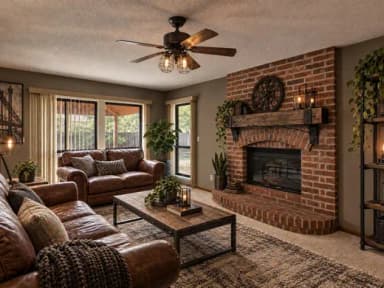 Industriale
Prima di pubblicare
Mobili in uno stile.Non una foto da catalogo.
- Lo staging aggiunge mobili e decorazioni. Pareti, pavimenti e finestre restano.
- L'arredamento mantiene i pezzi già presenti nella stanza.
- Il tuo originale resta accanto a ogni risultato.
- I download possono riportare un'avvertenza, impostata una volta nel tuo account.
Fantastica. Non è come le altre app di IA per la casa. Ho provato diversi strumenti simili e questo è di gran lunga il migliore. Poter lavorare su stanze completamente vuote cambia tutto
Buono a sapersi
- I tuoi prodottiSofaBrain disegna mobili nello stile che scegli. Non inserisce un prodotto specifico del tuo catalogo.
- Segnala le foto con stagingAlcuni stati e alcuni MLS richiedono di dichiarare le foto con staging virtuale o modificate, e le regole cambiano da mercato a mercato. Segnalale e conserva gli originali.Guida ai testi di avvertenza
- Controlla ogni risultatoL'IA può cambiare piccoli dettagli. Confronta ogni stanza arredata con l'originale prima di usarla.
Prezzi
Gratis per iniziare.Poi da $59 al mese.
I nuovi account ricevono 3 crediti gratuiti. La maggior parte delle modifiche e dei restyling usa 1 credito, e tutti gli strumenti attingono allo stesso saldo.
Account gratuito
$0
Per provarlo sulle tue foto
- Crediti
- 3
- Il tuo originale accanto a ogni risultato
- Sempre
Studio
$59 al mese
100 crediti ogni mese
- Modifica foto o restyling
- 1 credito
- Ingrandire un risultato
- 2 crediti
Che cos'è l'arredamento con IA?
Aggiunge mobili e decorazioni alla foto di una stanza, così vedi come potrebbe essere lo spazio arredato. SofaBrain mantiene il punto di vista, le pareti, i pavimenti e le finestre della tua foto e mostra l'originale accanto al risultato.
Posso tenere i mobili già presenti nella stanza?
Sì. L'arredamento dello studio di design aggiunge pezzi e mantiene quelli già presenti. Per una stanza vuota, usa l'home staging virtuale.
Posso arredare con un prodotto specifico del mio catalogo?
Non al momento. SofaBrain genera mobili nello stile che scegli; non inserisce un prodotto specifico. Per grandi volumi, la Pro API può creare lavori di staging dal tuo software.
Quali stanze posso arredare?
Lo strumento di staging copre soggiorni, camere da letto, sale da pranzo e studi in 5 stili. Lo studio di design copre più tipi di stanza, e l'home staging multivista arreda fino a 4 angolazioni della stessa stanza con gli stessi mobili.
Devo segnalare le foto con staging?
Se le foto servono a vendere o affittare un immobile, spesso sì. Alcuni stati e alcuni MLS richiedono di dichiarare le foto con staging virtuale. Segnalale, conserva gli originali e verifica le regole locali.
Quanto costa?
I nuovi account ricevono 3 crediti gratuiti. La maggior parte delle modifiche alle foto e dei restyling usa 1 credito ciascuno. Poi i piani partono da $59 al mese per 100 crediti.
Quando vuoi tu
Arreda una stanza vuotada una sola foto.
I nuovi account ricevono 3 crediti gratuiti. Il tuo originale resta accanto a ogni risultato. Poi i piani partono da $59 al mese per 100 crediti.