For interior designers
AI design visualization for interior designers in your client’s own room.
Upload a photo of the space and show the client a few clear directions: a new style, a new palette, or just new floors or cabinets. Compare each one with the room as it is, then share a link.
- 3 free credits for new accounts
- 1 credit per redesign or edit
- Studio: $59 a month for 100 credits
A real result: the after is what wall paint made from the before. Drag to compare.

How it works
The client’s room in.Directions they can react to.
Clients often struggle to describe what they want. Show them their own room in a few styles and let them react to real options.
- 1
Upload the room
A clear photo of your client’s space, empty or furnished.
- 2
Choose the direction
One of 27 styles and 20 palettes, or change only the walls, floors, cabinets or furniture.
- 3
Compare and share
Put the options side by side, refine one area, then share a link or download.
The tools
A whole new look,or one decision at a time.
Restyle the room in the design studio, or use a focused tool when the question is only the paint, the floor or the cabinets.
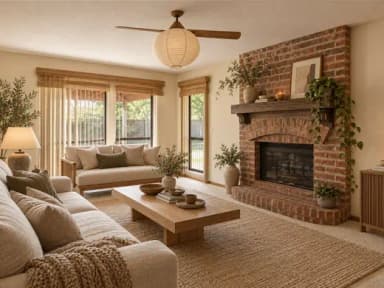 Japandi
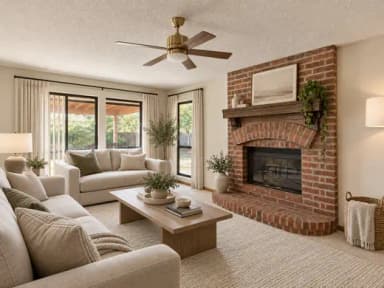 Modern
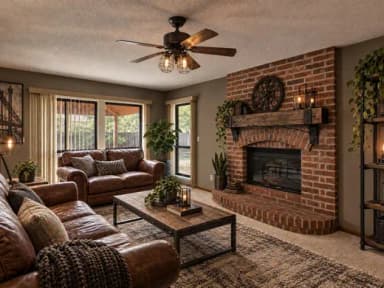 Industrial
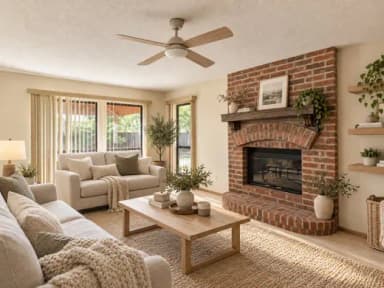 Scandinavian
 Bohemian
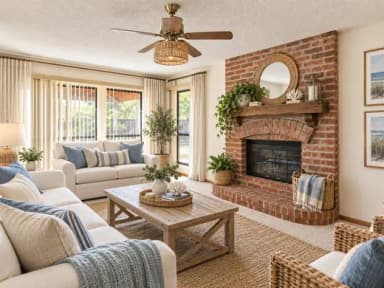 Coastal
Before you present
Concepts for the conversation.You make the call.
- Change one area, like the walls, floors, cabinets or sofa, and keep the rest of the photo.
- Use your own inspiration photos as a style.
- Ask for a light refresh or a bolder redesign.
- Share a link to any design, or download the options you want to present.
Amazing. Not like other home AI apps. I've tried a few different tools like this and this is by far the best. Being able to work on a completely empty rooms is a gamechanger
Good to know
- Not a product specThe images are AI-generated concepts. Confirm dimensions, materials and products before anything is ordered or built.
- Private or publicDesigns made on free accounts are public. Subscribers can keep them private, and new designs start private for them.
- Check every resultAI can change small details. Compare each option with the original photo before you present it.
Pricing
Free to start.Then from $59 a month.
New accounts get 3 free credits. Most edits and redesigns use 1 credit, and every tool draws on the same balance.
Free account
$0
To try it on your own photos
- Credits
- 3
- Your original beside every result
- Always
Studio
$59 a month
100 credits every month
- Photo edit or redesign
- 1 credit
- Upscale a result
- 2 credits
Which rooms and spaces can I work on?
Residential rooms such as living rooms, bedrooms, kitchens and bathrooms; exterior areas such as facades, balconies, patios and gardens; and commercial spaces such as offices, restaurants, retail stores and hotel lobbies.
Can I control how much the AI changes the room?
Yes. Ask for a small change to stay close to the original photo, or a bigger one for a bolder redesign.
Can I change only one part of a room?
Yes. Pick the area you want to change, such as the furniture, walls, floors, kitchen cabinets, countertops, lighting, windows or doors. The rest of the photo stays.
How do I share designs with a client?
Every design has a share link. You can also download the results you want to present.
Are my designs private?
Subscribers can keep designs private, and new designs start private for them. Designs made on free accounts are public.
Are the images exact plans for the finished room?
No. They are AI-generated design concepts. Use them to agree on a direction with your client, then confirm dimensions, materials and products before anything is ordered or built.
How much does it cost?
New accounts get 3 free credits. Most photo edits and redesigns use 1 credit each. After that, plans start at $59 a month for 100 credits.
Ready when you are
Show the next clienttheir own room, restyled.
New accounts get 3 free credits. Upload a room and compare a few directions. After that, plans start at $59 a month for 100 credits.